

For Galleries and teams that want to collaborate on exhibitions under a shared identity.
Organizations and roles
What organizations are on ArtSpace, the Owner / Admin / Member roles, org-owned spaces, and how organizations get their own dashboard and verification.
What is an organization?
An organization is a shared identity for a gallery or team. Instead of everything belonging to one personal account, an organization lets several people collaborate on exhibitions under a single name. It is the right choice when a gallery, studio, or collective wants to publish work together.
An organization has its own name and address, separate from any individual member, and exhibitions can be owned by the organization rather than by a person.
An organization's display name can be edited any time. Its URL name (slug) — the address — can also be changed later in settings, but doing so changes the organization's web address, so links to the old one will break. See Create an organization.
Roles: Owner, Admin, Member
Everyone in an organization has a role that determines what they can do. There are three:
- Owner — has full control of the organization, including its most sensitive settings. The Owner ultimately answers for the organization.
- Admin — helps run the organization: managing members and handling organization settings and work alongside the Owner.
- Member — a contributor who participates in the organization's work without administrative control over the organization itself.
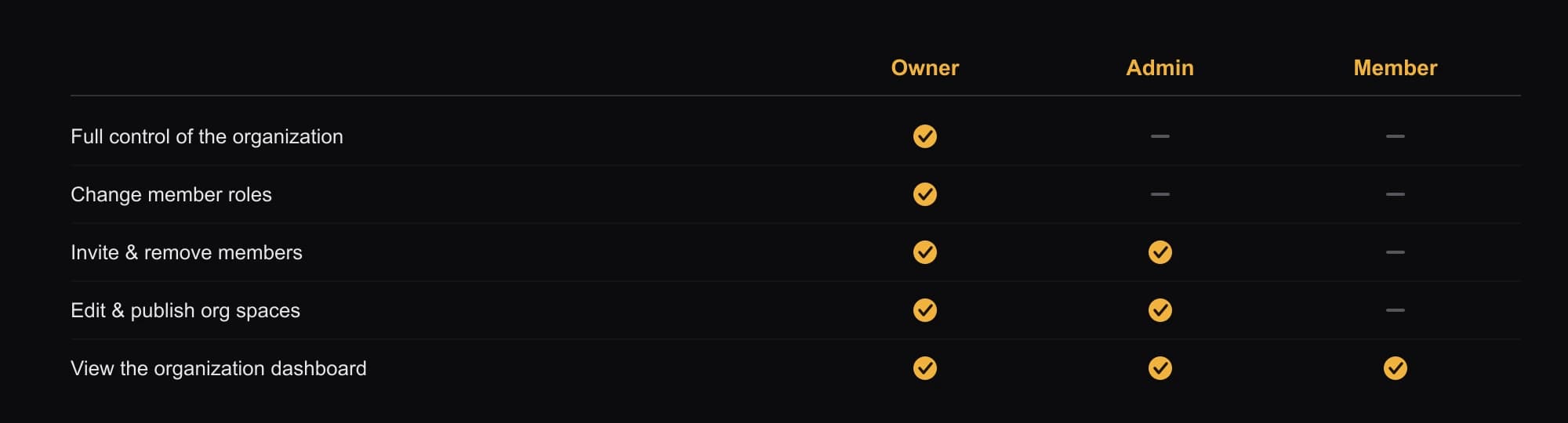
Roles are managed by the Owner and Admins. For inviting people and changing roles, see Manage members.
Org-owned spaces
When you create a Space, you choose whether you own it or an organization owns it. A Space owned by an organization belongs to the gallery or team rather than to a single person, so it stays with the organization and can be managed by its members according to their roles.
For how org-owned exhibitions are created and managed, see Organization spaces.
Its own dashboard and verification
An organization is a first-class identity, so it gets its own:
- Dashboard — the same analytics and Space management as a personal Dashboard, but scoped to the organization and accessible to its members.
- Verification — an organization can request its own verification badge (the same blue check), separate from any member's personal badge. This is requested in the organization's settings by an Owner or Admin.